Convert WIFs to Rigid Heddle Designs with Threading Diagrams!
planning projectsNot So Rigid DesignerWeaving Softwarepick-updraftsI’ve been making good progress on a new feature I’ve always wanted to have in Not So Rigid Designer: WIF import!
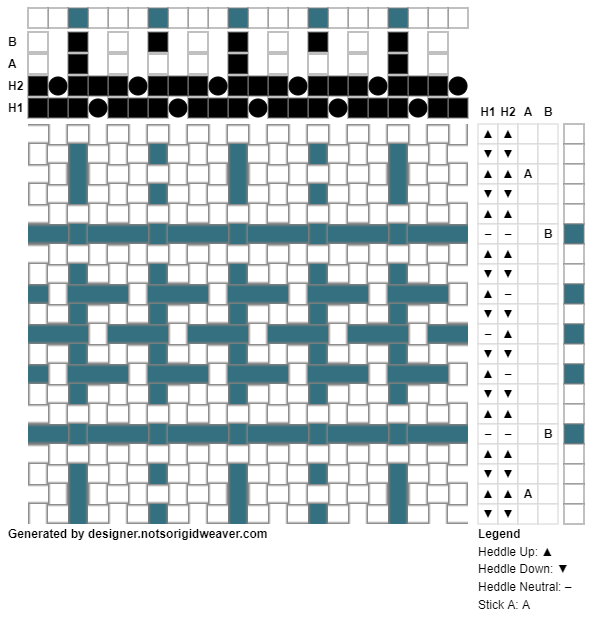
The first pass of WIF import, now available in preview for Premium subscribers, supports loading 2-4 shaft WIF files as designs using 1-3 heddles. Premium subscribers should see the Import Wif button next to the Create Design buttons. For now it only supports WIF files that use a Tie Up, but support for Lift Plan and more shafts (via pick up sticks) is coming soon.
WIF files are the standard way that designs can be shared between weaving software. And if you don’t use other weaving software, the Handwoven Library and Handweaving.net have WIF files available for download.
You can import a WIF file and make edits to it as a design, or just use it for the threading diagram and weaving sequence. This is a big help as converting shaft loom designs to multi-heddle designs can be tricky! You can also now swap the order of the heddles and pick up sticks - sometimes it makes a cleaner threading or easier to follow weaving sequence.
I’m still working on fleshing out this feature and making it more flexible, but I’ve got it to a stage where it’s quite useful!
Basic subscribers, much of this functionality will come to you, but you’ll have to wait a little longer as a big perk of being a Premium subscriber is getting access to new features first!
- Previous: Buying Canadian Yarn
Check out Not So Rigid Designer, the online weaving software for rigid heddle loom weavers!